If you're in the custom apparel business, you've likely heard about DTF printing. It's a game-changer for producing vibrant, durable transfers on demand. But as your orders grow, managing individual prints can become a bottleneck. That's where a DTF gangsheet builder comes in. This tool lets you arrange multiple designs on a single sheet, maximizing your printer's output and slashing material costs. In this guide, we'll explore how to use a gangsheet builder effectively, why it's essential for scaling your business, and practical tips to get the most out of every print.
What Is a DTF Gangsheet Builder?
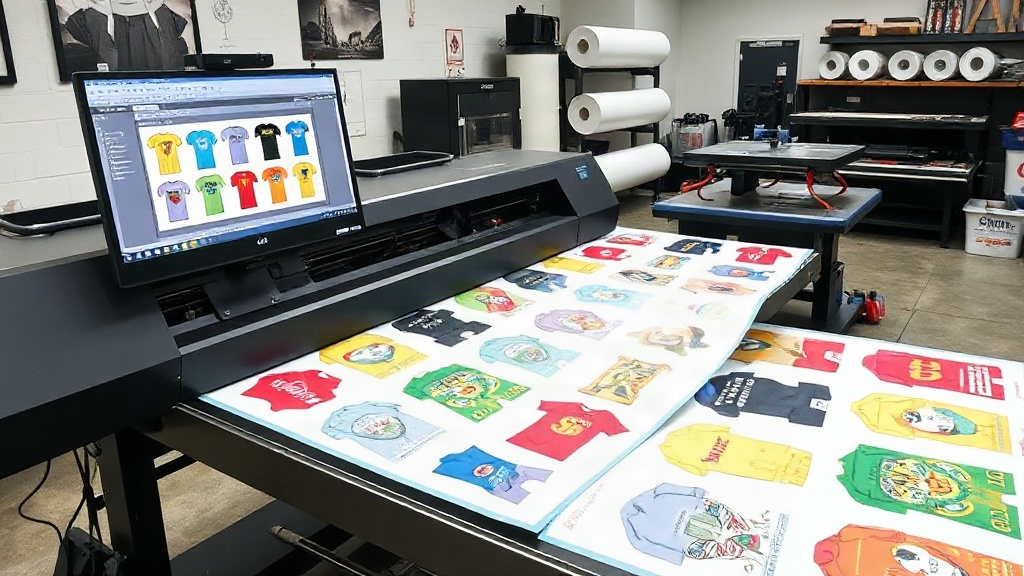
A DTF gangsheet builder is software that helps you nest multiple DTF transfer designs onto one large sheet, typically 22 or 24 inches wide and up to several feet long. Instead of printing each design separately, you gang them together, hence the term "gang sheet." This approach dramatically reduces waste, saves time, and lowers your cost per print.
Think of it like a digital jigsaw puzzle: you input your designs, set the dimensions, and the builder automatically arranges them for optimal use of space. Many builders also allow manual adjustments, so you can fine-tune the layout.
Why Gang Sheets Matter for DTF Printing
DTF printing involves transferring a design onto a film, then applying it to fabric with heat. The film and powder used in the process are significant costs. By printing multiple designs on one sheet, you use less film and powder per design. Plus, you minimize printer downtime because you're not constantly loading and unloading small sheets.
For example, a small print shop that switches to gang sheets can cut film waste by up to 40% and reduce printing time by half. That's a huge boost to your bottom line.
Key Features to Look for in a DTF Gangsheet Builder
Not all gangsheet builders are created equal. Here are the must-have features that will make your life easier:
- Automatic Nesting: The builder should automatically arrange designs to minimize empty space. Look for algorithms that rotate and flip designs as needed.
- Manual Editing: Sometimes you need to tweak the layout. A good builder lets you drag, drop, resize, and rotate individual elements.
- Template Saving: If you frequently print similar orders (e.g., a set of sizes for a team jersey), save the layout as a template for quick reuse.
- Integration with Design Software: The builder should import files from popular formats like PNG, PDF, and AI. Some even integrate directly with Adobe Photoshop or Illustrator.
- Cost Calculator: A built-in calculator that estimates film and powder usage based on your layout helps you price jobs accurately.
When evaluating a builder, consider your workflow. If you handle many small orders, automatic nesting is crucial. If you do custom work, manual control is key.
How to Create an Efficient Gang Sheet: Step-by-Step
Ready to build your first gang sheet? Follow these steps to ensure you're maximizing efficiency.
Step 1: Gather and Prepare Your Designs
Collect all the designs you need to print. Ensure they are high-resolution (300 DPI recommended) and have transparent backgrounds if necessary. Crop any excess whitespace around the design to save space. If you're using a DTF gangsheet builder, you can often import multiple files at once.
Step 2: Set Your Sheet Dimensions
Standard DTF film rolls come in widths of 13, 17, 22, or 24 inches. Choose the width that matches your printer. For length, you can set it to the total height of your designs plus a small margin. Some builders let you set a maximum length to avoid overly long sheets that are hard to handle.
Step 3: Let the Builder Nest Automatically
Upload your designs and hit the auto-nest button. The software will arrange them to use the least amount of film. Review the layout: sometimes manual adjustments can squeeze in an extra design. For instance, if you have a long, narrow design, you might rotate it to fit alongside others.
Step 4: Add Registration Marks and Cut Lines
Most DTF printers require registration marks for accurate cutting. Your builder should automatically add these. Also, add cut lines around each design for easy separation after printing. This saves time during the finishing process.
Step 5: Export and Print
Once satisfied, export the gang sheet as a high-resolution PDF or PNG. Send it to your DTF printer. After printing, apply hot melt powder, cure it, and you're ready to press. The gang sheet approach means you can produce a batch of transfers in one go.
Maximizing Profits with Gang Sheets
Using a DTF gangsheet builder isn't just about saving time; it's a strategic move to increase profitability. Here's how:
- Reduced Material Costs: Less film and powder per transfer means lower cost per unit. You can either pocket the savings or offer competitive pricing to win more customers.
- Higher Throughput: Print more designs in less time. You can take on larger orders or offer faster turnaround, which is a major selling point.
- Less Waste: Environmentally friendly and cost-effective. Customers appreciate businesses that minimize waste.
- Scalability: As your business grows, gang sheets allow you to handle increasing volume without proportional increases in labor or material costs.
Consider this: a shop that prints 100 transfers per day using individual sheets might spend 30% more on film than one using gang sheets. Over a year, that's thousands of dollars in savings.
Common Mistakes to Avoid When Using a Gangsheet Builder
Even with great software, mistakes can happen. Here are pitfalls to watch out for:
- Overcrowding: Packing designs too tightly can cause cutting issues or color bleeding. Leave a small gap (0.1-0.2 inches) between designs.
- Forgetting Bleed: If your design has a background, ensure it extends slightly beyond the cut line to avoid white edges after cutting.
- Ignoring Print Orientation: Some DTF printers have a preferred direction for film. Make sure your builder accounts for that.
- Not Testing: Always print a small test sheet with new layouts to check for color accuracy and cut alignment.
Also, keep your builder software updated. New features and bug fixes can improve efficiency.
Integrating Gang Sheets into Your Workflow
To get the most from your DTF gangsheet builder, integrate it into your daily operations. Here are some tips:
- Batch Similar Orders: Group orders by film width or design size to minimize setup changes.
- Standardize Sizes: If you offer common sizes (e.g., 10x10 inches), create templates for each. This speeds up the nesting process.
- Train Your Team: Ensure everyone knows how to use the builder and understands the importance of efficient layouts.
- Monitor Material Usage: Track film and powder consumption before and after implementing gang sheets to quantify savings.
Many shops find that after switching to gang sheets, they can reduce their prices or increase their profit margin without losing customers.
Frequently Asked Questions
What is the ideal width for a DTF gang sheet?
The ideal width matches your printer's maximum film width, commonly 13, 17, 22, or 24 inches. Using the widest possible sheet reduces waste because you can fit more designs across. However, if your orders are typically small, a narrower width might be more manageable. Always check your printer's specifications.
Can I use a gangsheet builder for other printing methods?
While gangsheet builders are optimized for DTF printing, the concept applies to other methods like DTG or screen printing. However, the software features may differ. For DTF, the builder must handle film-specific requirements like mirroring and registration marks. Some builders are versatile and support multiple outputs.
How do I calculate the cost savings from using gang sheets?
To calculate savings, compare the amount of film and powder used per design before and after. For example, if you previously used 10 square inches of film per design and now use 7, you save 30%. Multiply that by your monthly volume and material costs. Also factor in time saved, which can be allocated to other revenue-generating activities.
What file formats work best with a DTF gangsheet builder?
Most builders accept PNG, PDF, and TIFF. PNG with transparency is ideal for designs with no background. PDF is great for vector-based designs. Avoid low-resolution JPEGs as they may pixelate when printed. Always use 300 DPI for best results.
Do I need special software to create gang sheets, or can I do it manually?
You can create gang sheets manually in graphic design software like Photoshop or Illustrator, but it's time-consuming and prone to errors. A dedicated DTF gangsheet builder automates the process, ensures optimal nesting, and includes DTF-specific features like mirroring and registration marks. For efficiency and accuracy, dedicated software is highly recommended.
Embracing a DTF gangsheet builder is one of the smartest moves you can make for your custom apparel business. It streamlines production, cuts costs, and positions you for growth. Whether you're a solo entrepreneur or running a large shop, the right builder will pay for itself in no time. Start experimenting with layouts today and watch your efficiency soar.